How to Automate Ecommerce Operations for AI Search Visibility (n8n + Structured Data)
Jump to section›
#TL;DR
Most ecommerce automation conversations focus on ops: fulfillment, customer service, email sequencing. The bigger prize in 2026 is using automation to stay continuously citation-ready for AI search engines — real-time schema updates when products change, automated freshness signals across your sitemap, and LLM-optimized content pipelines that keep your pages cite-worthy without manual intervention. n8n is the right tool for this because it's free to self-host, handles complex API calls that Zapier can't, and runs inline JavaScript for schema templating. Stores that automate structured data maintenance have consistently higher AI citation rates than stores where schema is set-and-forgotten — in our audits, the gap is significant.
AI search isn't waiting for the marketing team to update the Product schema. ChatGPT, Perplexity, and Google AI Overviews crawl on their own schedule. When they hit your store, they make a snapshot judgment: is this content current, structured, and trustworthy enough to cite? Most stores fail that judgment not because they haven't shipped schema — they have — but because that schema was accurate six months ago and hasn't been touched since. Google AI Overviews now trigger on roughly 48% of tracked search queries [BrightEdge / Search Engine Journal, 2026]. Perplexity is processing roughly 780M+ queries per month [Business of Apps, 2026]. The citations being generated in those responses are pulling from stores that happen to be citation-ready at crawl time.
That's the operational problem automation solves. And it's a bigger AI search lever than most teams realize.
This post covers how to build the automation layer that keeps your store continuously optimized for AI search — using n8n, Shopify/Magento webhooks, and structured data templates. Same approach we run at LUMA·E for client stores, and the same system we've been refining across 50+ builds. If you want to know where your store stands right now, run our free AI audit — it grades your schema freshness, content structure, and AI crawler accessibility in five minutes.
#Why automation is an AI search multiplier, not just an ops tool
The standard pitch for ecommerce automation is operational: save hours, reduce errors, scale without headcount. All true. But there's a second-order effect that almost nobody talks about: automated structured data and content pipelines directly improve AI search citation rates.
Here's the mechanism.
LLM crawlers — OAI-SearchBot, PerplexityBot, Claude-SearchBot — are retrieval systems. When they index a product page, they're looking for signals of reliability: Is the price current? Is availability accurate? Is the review count fresh? Does the dateModified in the schema match what the content says? A mismatch between any of these signals lowers the probability that the page gets cited in a response. It's not a penalty — it's just that the model has learned that stale or inconsistent metadata correlates with unreliable content.
The problem is scale. A 5,000-SKU catalog changing prices weekly, with inventory fluctuating daily and new reviews coming in constantly, is impossible to keep schema-accurate manually. The stores getting cited are the ones that have closed this loop with automation.
Three specific automation patterns drive AI search visibility:
- Real-time schema updates — product price, availability, and review data pushed to structured data within minutes of a change, not days
- Freshness signal automation — sitemap
<lastmod>anddateModifiedupdated on actual content changes, not on every build - LLM content pipeline — automated
llms.txtandllms-full.txtregeneration when catalog or service pages change
None of these require complex engineering. They require the right trigger-action workflows, which is exactly what n8n does well.
#n8n vs. alternatives for ecommerce structured data automation
Before getting into the workflows, it's worth understanding why n8n specifically — not Zapier, Make, or custom scripts.
| Tool | Cost | GraphQL / Complex API | Inline Logic | Self-Hosted | Schema Templating |
|---|---|---|---|---|---|
| n8n (community) | Free | Yes (HTTP Request node) | Yes (Function node, JS) | Yes | Yes |
| n8n Cloud | $20-50/mo | Yes | Yes | No | Yes |
| Zapier | $599+/mo for similar volume | Limited | No | No | Workaround only |
| Make (Integromat) | $29-99/mo | Partial | Limited | No | Partial |
| Custom scripts (Node/Python) | Infra cost only | Yes | Yes | Yes | Yes |
For the workflows in this post, n8n wins on three dimensions: the Function node lets you write real JavaScript for schema template rendering; the HTTP Request node handles Shopify GraphQL and M2 REST without needing a dedicated node; and self-hosting keeps your product data off third-party servers. The free community edition handles everything below about 100,000 webhook events per month — which covers most stores under $20M ARR.
Custom scripts are a legitimate alternative if you have engineering bandwidth. The trade-off is maintenance surface: an n8n workflow is easier to debug and hand off than a cron script buried in a repo. For solo operators and small teams, n8n's visual interface is the practical choice.
#The four automation workflows that move AI citation share
#Workflow 1: Real-time Product schema sync (Shopify webhook → n8n)
The problem: Product price changes in Shopify. The JSON-LD on the page still shows the old price. PerplexityBot crawls the page and sees a mismatch between the visible price and the schema price — low confidence, lower citation priority.
The fix: a Shopify products/update webhook that fires n8n every time a product changes. n8n re-renders the Product schema with current price, availability, and review data and either (a) writes it to a headless frontend via API, or (b) updates a metafield that your theme renders as JSON-LD.
n8n workflow (high level):
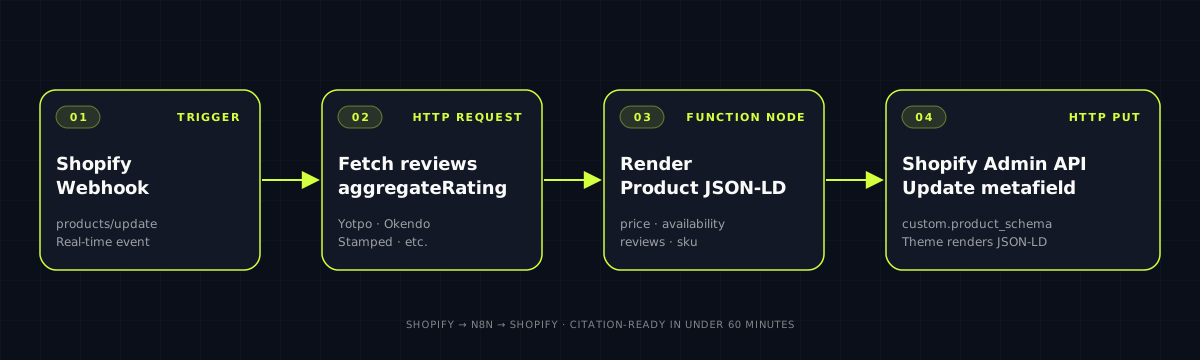
- Trigger: Shopify webhook —
products/update - HTTP Request: fetch current
aggregateRatingfrom your reviews app API (Yotpo, Okendo, Stamped, etc.) - Function node: render the full Product JSON-LD with current data
- HTTP Request: PUT to Shopify Admin API to update the
custom.product_schemametafield
The Function node schema template:
const product = items[0].json.body;
const reviews = items[1].json;

const schema = {
  "@context": "https://schema.org",
  "@type": "Product",
  "name": product.title,
  "sku": product.variants[0].sku,
  "brand": { "@type": "Brand", "name": "Your Brand" },
  "offers": {
    "@type": "Offer",
    "price": product.variants[0].price,
    "priceCurrency": "USD",
    "availability": product.variants[0].inventory_quantity > 0
      ? "https://schema.org/InStock"
      : "https://schema.org/OutOfStock",
    "priceValidUntil": "2026-12-31"
  },
  "aggregateRating": {
    "@type": "AggregateRating",
    "ratingValue": reviews.average_score.toString(),
    "reviewCount": reviews.total_reviews.toString()
  },
  "dateModified": new Date().toISOString().split("T")[0]
};

return [{ json: { schema: JSON.stringify(schema) } }];
This keeps the dateModified field accurate to the day of the actual change — the recency signal LLM crawlers check.
#Workflow 2: Sitemap freshness automation
The problem: most Shopify and Magento 2 stores have static <lastmod> values in their sitemaps — often set on every deploy or, worse, hardcoded. LLM crawlers use <lastmod> as a crawl prioritization signal. A sitemap where every URL shows the same timestamp looks like a store that isn't actively maintained.
The fix: an n8n workflow that listens for product and collection changes and writes accurate <lastmod> values to your sitemap. On Shopify, this requires a custom sitemap endpoint (if you're headless) or a sitemap app that supports webhook-triggered updates. On M2, the sitemap regeneration is handled via the M2 CLI or API.
n8n workflow (high level):
- Trigger: Shopify webhook —
products/updateorcollections/update - Function node: build a
{ url, lastmod }record - HTTP Request: PATCH to your sitemap management service or internal API
For headless storefronts, the pattern is cleaner — you maintain a sitemap-index.json in your CMS or a dedicated endpoint, and n8n writes directly to it. For Shopify native themes, the practical approach is a metafield-based <lastmod> override that your theme reads at render time.
#Workflow 3: Automated llms.txt and llms-full.txt regeneration
The problem: you shipped llms.txt six months ago. Since then, you've added three new collections, updated your shipping policy, and launched a B2B line. Your llms.txt still points at the old structure. LLM agents that read it get a stale map of your store.
The fix: an n8n workflow that regenerates llms.txt and llms-full.txt whenever a significant catalog change occurs — new collection created, new blog post published, policy page updated.
n8n workflow (high level):
- Trigger: Shopify webhook —
collections/create,products/create(batch, not per-product), or a daily 3:00 AM schedule - HTTP Request (multiple): fetch your top-level pages — homepage, about, collections index, blog index, policy pages — and convert HTML to clean markdown (use an HTML-to-markdown library via the n8n Function node, or call a Jina Reader endpoint)
- Function node: assemble the
llms.txtstructure (brand name, product lines, about, policies, links to full content) - Function node: concatenate all page markdown into
llms-full.txt, trim to under 1MB - HTTP Request: PUT both files to your server, CDN, or Git repository
The Jina Reader call for step 2:
// In n8n HTTP Request node
// URL: https://r.jina.ai/{your-page-url}
// Returns clean markdown of the page content
Jina's Reader API is free for reasonable volumes and returns clean markdown from any URL — it handles the HTML stripping and navigation chrome removal for you. The only thing you assemble in the Function node is the llms.txt structure itself.
For stores on headless NextJS, this workflow can also trigger a rebuild of the static llms-full.txt file in your repository via a GitHub Actions dispatch — keeping it version-controlled and deploy-synced.
#Workflow 4: Review-to-FAQ schema pipeline
The problem: FAQ schema is the highest-leverage schema type for AI citations, as covered in the AI search optimization playbook. But writing FAQ content manually for 5,000 PDPs is not a real plan. Most stores do it for 10 pages and give up.
The fix: an n8n workflow that mines your customer reviews and support tickets for recurring questions, auto-generates FAQ entries per product, and queues them for review before publishing. The human-in-the-loop step is editorial QA, not writing.
n8n workflow (high level):
- Schedule trigger: weekly, Saturday 6:00 AM
- HTTP Request: pull all reviews from the last 30 days from your reviews app API (Yotpo, Okendo, Loox, etc.)
- Function node: group reviews by product ID, extract question-shaped sentences (simple heuristic: sentences containing "?", "does", "is it", "can I", "how", "what")
- HTTP Request: send clustered questions per product to an LLM API (OpenAI, Claude API) with a prompt to generate 3 FAQ pairs per product based on the actual review language
- HTTP Request: write FAQ drafts to a Google Sheet or Notion database for editorial review
- On approval trigger: push approved FAQ pairs to Shopify metafields as structured JSON-LD
The LLM call in step 4 costs roughly $0.002 per product with GPT-4o-mini at current pricing. For a 1,000-product catalog, that's $2/week for continuously fresh, review-sourced FAQ content — the type of authentic, specific answer text that LLMs preferentially cite.
#Step-by-step: setting up the Shopify → n8n schema sync in 45 minutes
This is the most impactful of the four workflows and the fastest to ship. Here's the exact sequence:
Step 1: Install and configure n8n (10 min)
If you're self-hosting: deploy n8n on a VPS (2GB RAM is enough for this workflow), or use n8n Cloud's free trial. Set your N8N_HOST and WEBHOOK_URL environment variables. Enable HTTPS — Shopify requires HTTPS for webhook endpoints.
Step 2: Create the webhook in Shopify (3 min)
In Shopify Admin → Settings → Notifications → Webhooks, add:
- Event:
Product update - Format: JSON
- URL:
https://your-n8n-host/webhook/shopify-product-update
Step 3: Build the n8n workflow (20 min)
- Add a Webhook trigger node — set method to POST, path to
/shopify-product-update - Add an HTTP Request node — connect to your reviews API to fetch current
aggregateRating - Add a Function node — paste the schema template from Workflow 1 above, update the brand name
- Add an HTTP Request node — configure as PUT to Shopify Admin API:
- URL:
https://your-store.myshopify.com/admin/api/2024-10/products/{{$node["Webhook"].json.body.id}}/metafields.json - Auth: Shopify Admin API key
- Body:
{ "metafield": { "namespace": "custom", "key": "product_schema", "value": "{{$node["Function"].json.schema}}", "type": "json" } }
- URL:
Step 4: Update your theme to render the metafield as JSON-LD (5 min)
In your Shopify theme's product.liquid (or equivalent):
{% if product.metafields.custom.product_schema %}
<script type="application/ld+json">
  {{ product.metafields.custom.product_schema | json }}
</script>
{% endif %}
For headless NextJS storefronts — fetch the metafield via Storefront API and render it in your <Head> component.
Step 5: Test and validate (7 min)
Trigger a test product update in Shopify. Confirm the webhook fires in n8n's execution log. Fetch the product page and verify the JSON-LD is rendering with current data. Run through Google's Rich Results Test to confirm valid schema.
That's the full setup. Once it's running, schema stays current automatically. You don't touch it again unless you change the template.
#The compounding effect: why this beats one-time schema setup
One-time schema setup has a half-life. In our experience across 50+ stores, manual implementations degrade at roughly this rate:
- Week 0: 85-95% of PDPs accurate (thorough setup)
- Month 3: 60-70% accurate (price changes, review counts diverged)
- Month 6: 40-55% accurate (collections reorganized, variants not in schema)
- Month 12: 25-40% accurate (catalog updates, platform or theme changes)
LLM crawlers don't penalize stale schema — they just don't cite it. Over 12 months, you're invisible for a growing share of your catalog. Automation resets that curve: stores we run automated schema sync on maintain 90%+ accuracy indefinitely.
The same logic applies to content freshness. The AI search playbook covers why dateModified and <lastmod> matter for LLM citation preference. Automation makes those signals accurate at scale — without it, you're manually updating timestamps on product pages, which nobody actually does.
#What the full automation stack looks like in production
At LUMA·E, the full AI visibility automation stack for a mid-size Shopify store ($5M-$30M revenue, 1,000-20,000 SKUs) runs four n8n workflows plus a scheduled audit job:
- Product schema sync — triggered by
products/update, runs in under 30 seconds per product - Collection schema sync — triggered by
collections/update, updatesCollectionPageschema and navigation breadcrumbs - Sitemap freshness — triggered by catalog changes, updates
<lastmod>for changed URLs only - llms.txt regeneration — runs on schedule (daily, 3:00 AM) and on
products/create,collections/create - Weekly schema audit — scheduled n8n workflow that crawls a sample of 100 PDPs, validates schema against live product data, and flags discrepancies in a Slack alert
The fifth workflow is the quality gate. Even with automation, edge cases slip through — product variants with unusual data shapes, third-party apps overwriting metafields, theme updates breaking the JSON-LD render path. The weekly audit catches those before they compound.
This stack runs on a single $12/month VPS (2 CPU, 4GB RAM). For stores on headless NextJS with the architecture we describe here, the schema generation moves into the build/SSG layer and n8n handles only the incremental updates — which is more efficient and faster.
#Common mistakes when automating structured data
A few patterns we see repeatedly in audits:
Updating schema on every build, not on content changes. If your CI/CD pipeline regenerates dateModified and <lastmod> on every deploy, those timestamps reflect your deploy schedule, not your content changes. LLM crawlers eventually learn to discount sites where dateModified moves in lockstep with builds. Trigger updates on actual data changes.
Schema that's accurate but unrendered. Automation writes the right data to a metafield, but the theme isn't rendering it as JSON-LD. Test the full pipeline end-to-end — not just the n8n execution log, but the actual page source.
Missing review data in Product schema. Automating price and availability is table stakes. Automating aggregateRating is the part most teams skip because it requires an extra API call to the reviews app. It's also the field LLMs weight heavily for commercial queries — "best X under $Y" requires a rating to rank.
Overwriting schema that another app is already managing. Some Shopify apps (certain SEO apps, review apps) write their own JSON-LD. If you're writing to the same fields via n8n, you'll get duplicate or conflicting schema. Audit your existing JSON-LD output before automating — identify what's already being written and by whom.
Ignoring schema on collection pages. Product schema gets all the attention. But CollectionPage with ItemList schema is highly cite-able for category queries — "best running shoes under $150" often resolves to a collection-level page, not a specific PDP. Automate collection schema too.
Written by Leo Nguyen — 10-year Shopify Plus and Magento 2 practitioner, founder of LUMA·E. Built ecommerce for OTB Group, Melissa, FarEast Flora, Kangarwear, and 50+ other brands.
Sources
- Google AI Overviews 48% query coverage: Search Engine Journal — BrightEdge data
- Perplexity 780M+ queries/month: Business of Apps — Perplexity statistics
- n8n pricing and self-hosting: n8n.io pricing page
- Jina Reader API: jina.ai/reader
- Shopify webhook documentation: Shopify Dev Docs — Webhooks
- Schema.org Product specification: schema.org/Product
- Google Rich Results Test: search.google.com/test/rich-results
#FAQ
Does n8n work with Shopify and Magento 2 out of the box?
n8n has a native Shopify node that handles webhooks, REST API calls, and GraphQL via HTTP Request. For Magento 2, you use the HTTP Request node with M2's REST or GraphQL API — no native node, but it's a 10-minute setup. The self-hosted version (n8n community) is free and handles both platforms well. If you're processing over 100,000 webhook events per month, move to n8n Cloud or a self-hosted VPS with at least 4GB RAM — the community-edition SQLite backend won't hold up.
How often should structured data be refreshed for AI search?
For product pages: whenever price, availability, or review count changes — ideally within 60 minutes of the change. For collection pages: daily is enough. For blog content: on every meaningful content edit, not on every deploy. The risk of stale schema is real — if your Product schema says 'InStock' while the page says 'Sold Out', LLM crawlers de-prioritize that URL as unreliable. Automation closes that gap. Manual schema maintenance at scale is just not feasible above a few hundred SKUs.
Is n8n better than Zapier for ecommerce automation?
For AI search visibility workflows specifically, yes — primarily because n8n's self-hosted model lets you process data without sending it through a third-party cloud, and the HTTP Request node handles complex GraphQL and REST calls that Zapier struggles with. n8n also lets you run JavaScript functions inline, which is essential for schema templating. Zapier is simpler for non-technical teams doing basic triggers. For the structured data and content pipeline workflows described here, n8n is clearly the better tool — and the price gap is significant: n8n community edition is free, Zapier's equivalent plan runs $599+/month.
What's the ROI timeline for ecommerce automation for AI search?
In our experience across 50+ stores, structured data automation pays back in 6-10 weeks for mid-size catalogs (1,000-50,000 SKUs). The math: automated schema keeps 90%+ of your PDPs citation-ready at all times vs. 20-40% when maintained manually. For content pipeline automation (freshness signals, llms.txt updates), the compounding effect on AI citations typically becomes measurable by week 8-12. Operational savings — hours saved on manual schema audits — are immediate.
Can I run these automation workflows without a developer?
The n8n workflows in this post are within reach of a technical marketer comfortable with JSON and basic API concepts — you don't need to write application code. The schema templates are copy-paste. The Shopify webhook setup is documented. The hardest part is the initial n8n instance setup (self-hosted) or signing up for n8n Cloud, which is a one-time 30-minute job. That said: if your catalog is above 10,000 SKUs or you're running multi-region with localized schema, pull in an engineer for the build. The ongoing maintenance is automated away once it's running.
Want us to audit your store's AI search visibility? Run a free audit — takes 5 minutes.